0
Dependencies
3
Editor Panes
Live
Preview Mode
Any
Device / Browser
Learners were losing momentum before writing a single line of code
When CodeVent Digital's students started learning HTML and CSS, they faced an immediate friction point: setting up a local development environment. Installing VS Code, configuring file paths, understanding how to open a browser, all before touching a single HTML tag. Many dropped off right here.
Existing online editors like CodePen and JSFiddle were either too feature-heavy for beginners, required accounts, or loaded slowly on low-bandwidth connections common in Nigeria. The goal was something immediate, distraction-free, and fully offline-capable.
Build the editor into the browser itself — no installs, no accounts, no friction
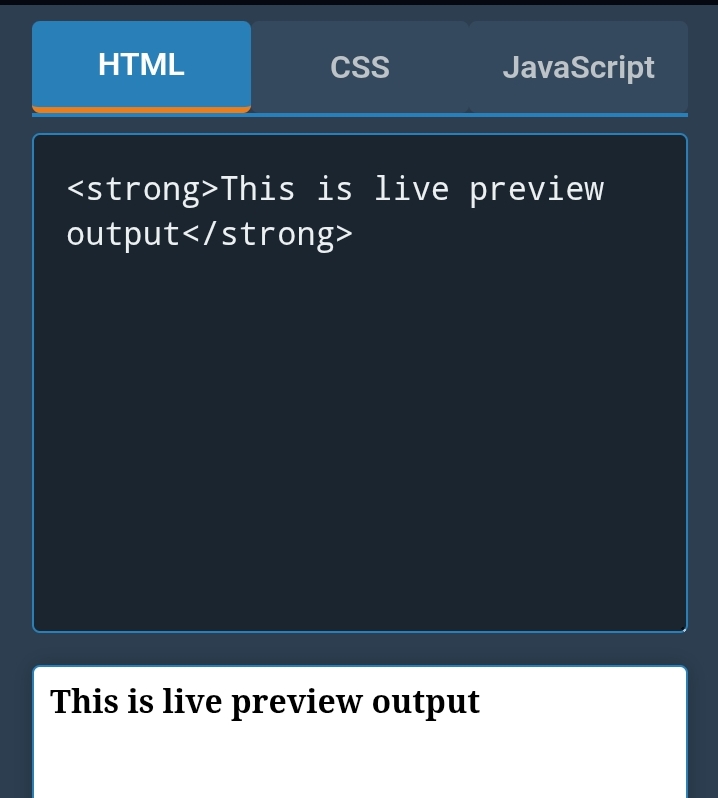
I designed and built a single HTML file that is itself a working IDE. Using pure HTML, CSS, and JavaScript, no frameworks, no build tools, it renders three independent editor panes (HTML, CSS, JS) and updates a live preview iframe in real time as the user types.
Split-Pane Layout
HTML, CSS, JS panes side-by-side with live iframe output
Offline-Capable
Works with no internet after initial load, saves as a file
Any Device
Runs on phone browsers including Chrome Android
The technical approach was deliberate: using srcdoc on an iframe element to inject editor content as a live document, debounced with requestAnimationFrame for smooth real-time updates without performance degradation on slower devices.
Students now code on day one, not day five
The editor became the interactive environment embedded into CodeVent Digital's entire curriculum. Students click a link and immediately begin writing real code, no account required, no install, no friction. The drop-off at the "setup" stage of the learning path went to zero.
It also serves as a standalone shareable tool, students send it to friends as a "starter kit," generating organic word-of-mouth for the platform.
Need a similar tool built?
Whether it's a browser-based tool, a learning platform, or a developer utility, let's build it together.